 Junction
Open several links at once in the browser you choose
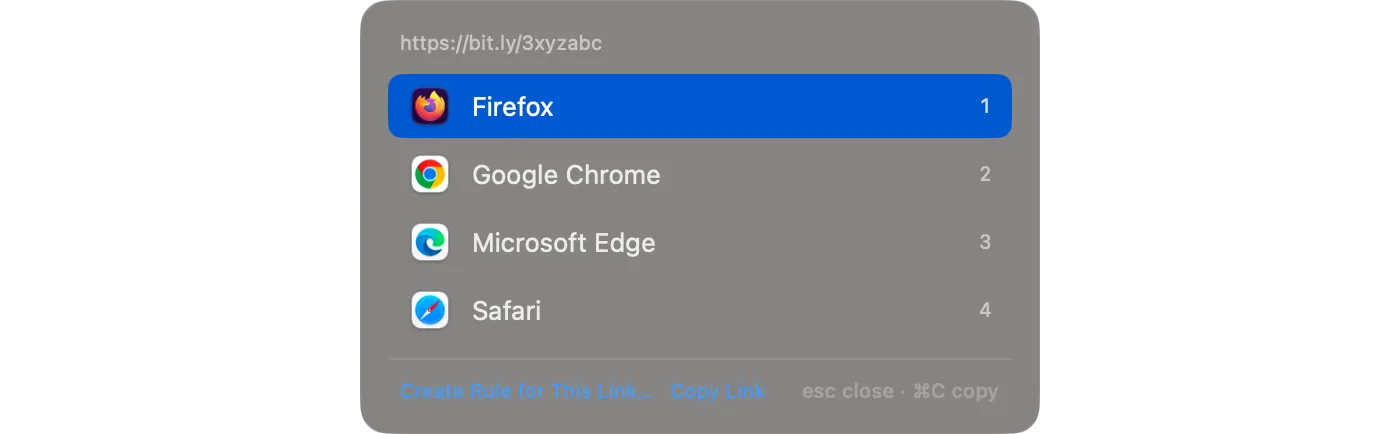
Junction is a free, open-source macOS app that becomes your default browser and routes each link by your rules. When links go to its picker, they don’t each get their own prompt: every link that arrives while the picker is open joins one list, and one choice opens them all.
How do I open several links in the same browser at once?
Send them to the picker, then choose a browser once. Links sent to the picker while it’s open collect in one list, and choosing a browser opens every link in it there.
Links reach the picker in three ways:
| How | When |
|---|---|
| Hold ⌥ Option while clicking | Any link, whatever your rules say |
A rule with the prompt action |
Every link that rule matches |
"fallback": { "app": "picker" } |
Every link no rule matches |
Can I copy all the links instead of opening them?
Yes. Click Copy 3 Links (the count matches your list) or press ⌘C in the picker, and every link goes to the clipboard, one per line — ready to paste into a note, a message, or a document.
How do I cancel the whole list?
Press Esc, or click away from the picker. That cancels every link in the list, not just the last one.
Can links from one app always go to the picker?
Yes. Combine sourceApps with the prompt action, and every link clicked in that app asks first. Here, links from Messages:
{
  "name": "From Messages → ask",
  "match": { "sourceApps": ["com.apple.MobileSMS"] },
  "action": { "prompt": true }
}$ junction test "https://example.com/shared-article" --source com.apple.MobileSMS
input: https://example.com/shared-article
source: com.apple.MobileSMS
rule: [1] From Messages → ask
action: show picker
url: https://example.com/shared-articlePut it near the top of your list, so no site rule catches those links first. More app-based rules are in routing links by app.
Can the picker show browser profiles too?
Yes — profiles appear alongside browsers, and Settings → Browsers chooses which ones show. The layout, labels, and icon size are covered in choosing a browser per link.
Get Junction
Junction is free and MIT-licensed, for macOS 13 or later on Apple silicon and Intel. Install it with Homebrew or the DMG, then follow the first-launch steps.